Современные
информационные технологии/2. Вычислительная техника и программирование
Eskendirova M., student
of the specialty 5B070300 - Information systems
Sorotnik N.V., master of natural sciences
A. Baytursynov Kostanay State University, Kazakhstan
Automation of operation of shop on
department «Groceries» in the VBA language
For many applications of Microsoft firm (including, for Word and Excel)
recently the Visual Basic version with the name VBA became a working language.
In MS Excel the VBA language is applied, starting with the Excel 5 version. VBA
comprises all positive lines of a simple language of programming of VB,
including all computing possibilities of Excel.
Distinctive feature of the VBA programming language is convenience in
case of the first acquaintance to programming as in the most used applications
of MS Office the Editor is built-in Visual Basic Editor, and also a
macrorecorder – the means intended for coding of actions of the user for their
subsequent repetition. At the same time, these tools can be used for
independent training in programming in the environment of MS Excel using VBA,
"writing" many steps by means of a macrorecorder, and then viewing
and adjusting a resultant code.
Thus, sequences of the commands written by means of a macrorecorder, or
manually in the VB editor, are called as macro instructions, or in abbreviated
form – simply as macroes. The macro of VBA is the special program intended for
automation of execution of often repeating operations, developed in the Visual Basic
for Applications language. In relation to subject of program applications under
the word the macro always means a macro instruction [1].
By means of macroes it is possible to create the user menus, dialog
boxes, and also toolbars which can significantly change the interface all of
known Word applications and Excel.
Superstructures are the programs adding in applications additional
opportunities. Speaking to normal language, the superstructure is a special
type the file which can contain different data on constants, macroes, the user
forms etc. [2].
Using Microsoft Excel 2003 by means of the Visual Basic for Applications
language the program for automation of operation of shop for department
"Groceries" is developed.
The table of the developed application consists of the following fields:
payment order No., code, description of goods, quantity, the price is over 1
commodity unit, the amount. Remaining lines are filled with values of the
appropriate fields. In a column 6 work 4 – го and 5 – го columns (quantity and the price) registers.
When clicking the Main menu button the form "List of Goods"
opens. In this form it is possible to execute such operations as: goods search,
adding of new goods, sale of goods and output from the main menu.
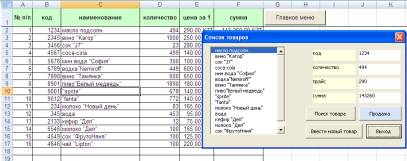
Figure 1. List of Goods window
Having
pressed the Goods Search button, the user causes the form in which it is
possible to run for search of goods in the nomenclature or in the name.
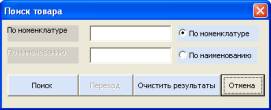
Figure 2. «Goods search»
For input of the name of new goods the user shall select the Enter New
Goods button from the main menu. After filling of fields it is necessary to
press the Apply button, then "to Enter" for saving of data.
If there is a need for sale of goods that, the user shall cause the form
"Goods Sale", having clicked the Sale button. From the list to select
necessary goods from the opened form, to specify the necessary quantity
therefore on the sheet "Groceries" the quantity of goods available
automatically will change. The Output button will return the user to the main
menu.
In log of the performed operations it is possible to trace information
on those goods which was sold. If it is necessary to update log of operations,
the Clear the Table button is applied.
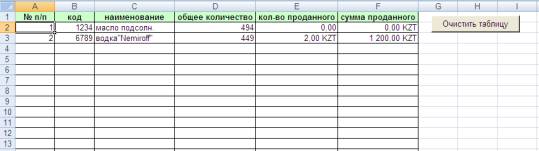
Figure 5. «Log of operations»
The developed application promotes fast and effective
calculation, search, introduction of various goods in shop with department of
foodstuff. The application's main form allows to cause other forms that is very
convenient by operation. Also Visual Basic for Applications allows the
programmer to the developer to make the smallest quantity of errors, displaying
messages if they appeared.
Literature:
1. Kuzmenko V. G. VBA 2000: Self-instruction manual. –
M.: JSC BINOMIAL Publishing House, 2000.
2. "Information technologies. Manual". Under
the editorship of A.K. Volkov. Moscow.
INFRA-M publishing house. 2001.