Современные информационные
технологии / Вычислительная
техника и программирование
V. Chychuzhko, M. Chychuzhko, I. Zubko
Cherkassy State Technological
University, Ukraine
Optimization of the
process of Caesar and Vigenere decoding methods in C # environment
Every
year, importance of computer information in our lives is increasing, and the
problems of its protection become more urgent. Protection from each type of
danger implies not only universal approaches, but also their own solutions that
can protect data against different threats. One of them is cryptography -
applied science about methods and ways of information transformation, with the
purpose of its protection from illegal users [1].

 The purpose of work - is to implement an interactive
environment for coding and decoding textual information using Caesar and Vigenere
methods [2]. Were added a point to break code without knowing a key, using
consequent search of right variant. Methods of encoding/decoding and user
interface were implemented in the environment of Microsoft Visual Studio using
language C #. Note: program is
resistant to register, any text is converted into uppercase. All characters (including
digits) will be kept unchanged, including spaces.
The purpose of work - is to implement an interactive
environment for coding and decoding textual information using Caesar and Vigenere
methods [2]. Were added a point to break code without knowing a key, using
consequent search of right variant. Methods of encoding/decoding and user
interface were implemented in the environment of Microsoft Visual Studio using
language C #. Note: program is
resistant to register, any text is converted into uppercase. All characters (including
digits) will be kept unchanged, including spaces.
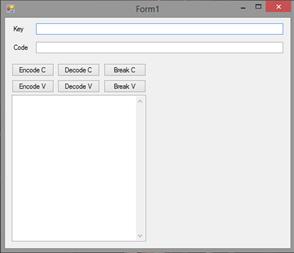
The user must enter the key and message/code and click
on the appropriate button. TextBox element, which is empty by default, will
display the code/message according to the selected function.
Regardless of Internet sources, were implemented my
own methods of coding according to used programming language [3]. You can see
code of these methods below:
private String
Cesar(int key, String code,int e)
{String message = ""; code.ToUpper();
for (int i = 0; i < code.Length;
i++)
{ if (!((int)code.ElementAt(i) <= 90 &&
(int)code.ElementAt(i)>=65))
{ message
= message + code.ElementAt(i); }
else
{message=message+(char)(((int)code.ElementAt(i)-65+key*e+26)%26+65);
}}
return message; }
private String Vigenere(String key,
String code, int e)
{String message = ""; code.ToUpper();
for (int i = 0; i < code.Length;
i++)
{if (!((int)code.ElementAt(i)<= 90 &&
(int)code.ElementAt(i) >= 65))
{message = message + code.ElementAt(i);
}
else
{message=message+(char)(((int)code.ElementAt(i)-65+((int)key.ElementAt(i
% key.Length) - -65) * e + 26) % 26 + 65); }}
return
message; }
In both cases, the function has three input parameters
and return processed text [4]. Methods are used for encoding and decoding and
excludes any errors for given values. Whether encoding information or function
decodes it affects input parameter e. By pressing the appropriate buttons to
the appropriate method is transmitted e = 1 to encode or e = -1 for decoding. Here
is code of encoding and decoding buttons calling Caesar method:
private void
button1_Click(object sender, EventArgs e)
{textBox3.Text=""+Cesar(Int32.Parse(textBox1.Text.ToString()),
textBox2.Text.ToString(), 1); }}
private void
button2_Click(object sender, EventArgs e)
{textBox3.Text=""+Cesar(Int32.Parse(textBox1.Text.ToString()),
textBox2.Text.ToString(), -1); }
Buttons of breaking have a slightly different
structure, so as encryption key is unknown. By pressing a button, generates a
loop that goes through all possible key, and sends them into the appropriate method.
Caesar method has only 26 possible combinations (based on English alphabet,
there are 26 letters), that’s why even to show all 26 variants on screen is not
a problem.
private void
button3_Click(object sender, EventArgs e)
{
textBox3.Text = "";
for (int i = 1; i < 26; i++)
{String c = Cesar(i, textBox2.Text.ToString(),
-1);
if(isText(c)){textBox3.Text = textBox3.Text + i + " " + c +
"\r\n";}}}
Vigenere method has more complicated aspects because
key is presented not as number, but as a word or even as a phrase. For key,
which length is n, we have 26n
variants of possible keys [5]. Output of such amount of information on the
screen is impractical. By the recommendation of teacher, were created methods
to break 3 and 4-length keys. Thanks to feature of method, they will include
keys with length 1 and 2. Were added additional TextBox, which is
invisible by default. It’s used only for showing results of 4-length-key
breaking. Code of Breaking button has to separated loops for counting 3 and 4
length keys. They go through all possible combinations of key. On every step
this loop generates one-time-key, which is sent to coding method. Below you can
see it’s code:
private void
button6_Click(object sender, EventArgs e)
{ textBox3.Text = "3-key\r\n";
textBox4.Visible = true;
textBox4.Text =
"4-key\r\n";
for (int i = 0; i < 26; i++)
{for (int j = 0; j < 26; j++)
{for (int k = 0; k < 26; k++)
{String key1 = ""+((char)(i + 65)) +
((char)(j + 65)) + ((char)(k + 65));
String c = Vigenere(key1, textBox2.Text.ToString(),
-1);
if (isText(c))
{textBox3.Text = textBox3.Text + key1 +
" " + c + "\r\n";}}}}
for (int i = 0; i < 26; i++)
{ for (int j = 0; j < 26; j++)
{ for (int k = 0; k <26; k++)
{ for (int l = 0; l < 26; l++)
{Stringkey1=""+((char)(i+65))+((char)(j+65))+((char)(k+65))+((char)(l+65));
String c = Vigenere(key1, textBox2.Text.ToString(),
-1);
if (isText(c))
{textBox4.Text = textBox4.Text + key1 + " "
+ c + "\r\n";}}}}}}
On the code above, you can see method. Its task is to
check, is this string value a text or just set of letters. The main idea is to follow
main rules of English language (in this case). After decoding, so-called
“possible message” is divided into words by symbols. New array of word is
checked according to the length of word. For example, there only two words in
English, which length is 1. They are pronoun “I” and article “a”. All other
found results are rejected and loop stops, moving to the next variant of
decoding [6]. All of words, which are composed by two letters, have 1 vowel and
1 consonant, anyway. So, the main goal is to proof it or reject. There are
special methods, which were implemented for this purpose. One of them tests if
letter is a vowel, and other one is using previous to count number of vowels in
word. Using them we can compare numbers and check 2-legth word. Methods are
shown below:
private bool
isVowel(char c)
{
bool b = false;
char[] vowels = { 'E', 'Y', 'U',
'I', 'O', 'A' };
for(int i=0; i<=5; i++)
{if (c.Equals(vowels[i]))
{ b = true; break; }}
return b; }
private int
countVowels(String s)
{int b = 0; for (int i = 0; i < s.Length;
i++)
{if (isVowel(s.ElementAt(i))) b++;}
return b; }
Words, which are composed of 3 letters, can have
different number of vowels. But they still correspond to rules: there can’t be
3 or 0 consonants in the 3-length word. That is the main test for them, used in
code. There is only one exception, it’s pronoun “YOU”, it has 3 vowels. Bigger
words require special method to check them. The rule is that we cannot have
more than 3 vowels or consonant in a row. So, method creates a loop, which goes
through all word and count vowels and consonants, using method above. If their
amount is more than 3 in the row, loop breaks and method returns false. Code of
this method is below:
 private bool
isWord(String s)
private bool
isWord(String s)
{bool b = true;
int v = 0;
int c = 0;
for (int i = 0; i < s.Length; i++)
{if (isVowel(s.ElementAt(i)))
{ v++; c = 0; }
else
{c++;
v = 0; }
if (c > 3 || v > 3) b = false; }
return b; }
 Here you can see main method, which unites all
previous ones in on place and makes them work together, preventing unreal text
output. When even one mistake is found on any step, loop stops, variant is got
rejected and program starts testing the next variant of decoding. This method
was also used in Caesar breaking, and depending on the text-length we can get
even only one right variant. The main factor, which influences on the amount of
results, is size of incoming text. The bigger text then less results we have,
and easier for us to find right. While testing I’ve encode message and then
I’ve tried to break this. Note: during
test, I decreased amount of possible variants, to prevent problems with
computer, counting 263 or 264 variants can be dangerous
for system. I’ve reduce it to 34 variants for 4-length word and 63
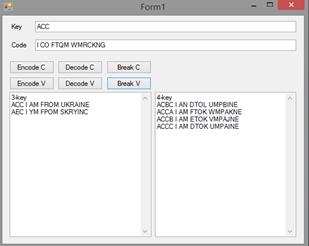
for 3-length. I’ve coded message “I am from Ukraine” and as you can see on the
screen, I have only 2 results instead of 216.
Here you can see main method, which unites all
previous ones in on place and makes them work together, preventing unreal text
output. When even one mistake is found on any step, loop stops, variant is got
rejected and program starts testing the next variant of decoding. This method
was also used in Caesar breaking, and depending on the text-length we can get
even only one right variant. The main factor, which influences on the amount of
results, is size of incoming text. The bigger text then less results we have,
and easier for us to find right. While testing I’ve encode message and then
I’ve tried to break this. Note: during
test, I decreased amount of possible variants, to prevent problems with
computer, counting 263 or 264 variants can be dangerous
for system. I’ve reduce it to 34 variants for 4-length word and 63
for 3-length. I’ve coded message “I am from Ukraine” and as you can see on the
screen, I have only 2 results instead of 216.
Considering the speed
of development of computer technology, we can be assume that in the near future
cryptography will become the "third literacy" along with mandatory
possession of a computer and information technology.
LITERATURE
1.
Martin, Keith M. Everyday
Cryptography. — Oxford University Press, 2012. — 142 p.
2.
Knudsen, Lars R. Block Ciphers—a
survey. — London: Springer, 1997.
3.
Henk C.A. van Tilborg. Encyclopedia of
Cryptography and Security. — Springer, 2005. — 115 p.
4.
Wobst R. Cryptology Unlocked — Chichester: John Wiley & Sons Ltd, 2007. — 554 p.
5.
Martin, Keith M. Everyday Cryptography. — Oxford University
Press, 2012. — 142 с.
6.
Bruen,
Aiden A. & Forcinito, Mario A. (2011). Cryptography,
Information Theory, and Error-Correction: A Handbook for the 21st Century. John Wiley & Sons. p. 21.