Samoylov A., Shtepa A.
Southern Federal University,
Russia
Development of web-applications on
the base of
Bitrix Framework
The
number of applications developed by means of web-technologies is increasing now.
First of all it is connected with convenience of using such applications. The
large quantity of tasks can be executed without resorting to software
installation, using only the browser. With the help of Internet technologies it
is possible to carry out purchases, to communicate, to work, to study. And it
only a small part of activity kinds that people can do in the Internet.
Demand
gives rise to the offer. Therefore every day the number of firms of developers
constantly grows. The quantity of development tools grows also. Some tools allow
to accelerate work of the programmer, and some of them allow to develop Internet
resources during a couple of hours. One of such development tools is Bitrix
Framework.
Bitrix
Framework is created on the basis of a PHP platform for development of web-applications.
On this platform 1C-Bitrix company created two popular products: «1C-Bitrix: Site
Management» and «1C-Bitrix: Corporate portal» [1]. Unlike other Framework, such
as Zend Framework, Bitrix Framework besides a set of classes has also the
developed interface of administration.
As
well as in many Frameworks and programming languages, in Bitrix Framework there
is a base allowing better to understand structure and features of a platform.
Before the starting of development, for user it is necessary to study this base.
First
of all, for the developer it is necessary to know the architecture of system. MVC (Model-view-controller,
"Model-representation-behavior", "Model- representation-controller")
- architecture of the software in which model of data of the appendix, the user
interface and operating logic are divided into three separate components, so,
the updating of one of the components has the minimum impact on other
components [2].
The
predominating role in this trio is called - "model". From this model
depend both "behavior", and "representation". Model accepts
inquiries (usually from "controller") and provides data for
"representation".
The
second of the importance is the controller. It interprets the data arriving
from the user, and informs model and representation from need of reaction.
The
third component is representation. Its fundamental obligation is information
display. By means of this component the user interface is formed.
In Bitrix Framework each of these components has the name (fig. 1). The model is API, a system kernel. Representation is templates. The controller is a component.
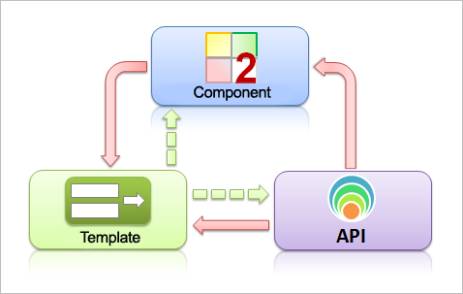
Fig. 1. Architecture of MVC for Bitrix
Framework
If to address to the file structure of Bitrix Framework, it is possible to see that each of all web-sites has a lot of identical catalogs. At every web-site which was developed with the help of Bitrix Framework in a root there is bitrix and upload catalog. The second catalog is intended for storage of files to which the database refers. This directory should be always protected from the start in it any sort of scripts, otherwise safety of this web-site can be broken. What concerns the first directory, it includes: the complete list of modules (models of data and API for access to these data), components (contains the controller and representation for use in the public section), templates (representation versions), and also the administrators sections, a directory with a cache of pages, files for management of events, javascript libraries and many other things.
First
of all it is necessary to pay attention to the three main folders: modules,
components and templates.
The
first directory contains modules. Some tens modules of system contain a set of
the functions, allowing to realize some global task, for example, Internet shop
work.
The
second directory contains a set of components of system. By the way, the
quantity of available components and modules depends on system edition. The
component structure as it was told earlier, includes representation and the
controller.
The
third directory contains templates of a site and components. The interface of
an administrators part gives control opportunity for everyone of the
directories of a web-site of own representation. At the first level of the
templates folder are situated directories of templates of a web-site settle
down. Each such template is consists of: the file of a cap (header.php), the
file of a cellar (footer.php), the folder with language files of a template,
templates of the components used in this template a web-site, and also files of
styles, javascript libraries and included areas.
Now,
when it became a little clear what structure Bitrix Framework has, it is
necessary to understand how every page of web-site develop. For example,
index.php file which is situated in the root. If we will open this page, it
will be possible to see the following structure:
1) header.php connection;
2) Working area (connection of the
components, included areas, html and a php-code);
3) footer.php connection.
It is
simple to guess, why such structure is used. At the appeal to this page,
information on its belonging to any template of a site is requested. After
getting of the identifier of a template, it is searching in templates
directory. What concerns connection of components, it is initially searching a
component template in a web-site template if there isn't found, it is searching
in templates of a directory of components if there also there is no template
with the demanded identifier, the mistake which doesn't influence further
loading of page stands out.
If
the architecture a Framework and process of formation of page of a web-site is
clear, it is possible to go to the data storage structure of this platform. In
Bitrix Framework data are stored in information blocks. It is the next level of
abstraction over the DBMS usual tables. Depending on the scope of application
expected loading, productivity and other factors, Bitrix Framework can use
either MySQL, or Oracle. The second DBMS is used seldom or never, generally on
very big projects. The first DBMS, as well as in other systems constructed on
the basis of PHP, is the most popular. Working with information blocks, the
user won't notice a difference between using of this or that DBMS, at design
the interface remains same.
One
of conveniences is that information blocks allow to create hierarchical
structure. If to present this structure in the form of a pyramid, at its top
there is a type of information block (this generalization of the highest
level). Settle down information block which can be much at each type below.
Each information block allows to create unlimited number of sections, and, the
enclosure of sections can be also unlimited. And in sections there can be an
unlimited quantity of elements.
The
greatest interest represents the information block – the block of homogeneous
information. It contains some set of attributes (base fields and properties).
Each property has type and a set of describing parameters.
Element
of the information block it is direct information stored in information block.
It can be news, the goods or any other object possessing properties, set in
settings of the information block.
Addition,
editing, removal, data acquisition – all these functions are applicable to an
element of the information block посредствoм the API functions. For example, it
is necessary to apply the GetList function to the organization of a sample of a
quantity of elements. Let's disassemble this function on an example:
CModule::IncludeModule(‘iblock’);
$rsItem
= CIBlockElement::GetList($arOrder, $arFilter, false, false, $arSelect);
while($arItem
= $rsItem->GetNext())
{
echo ‘Object with id = ’.$arItem[‘ID’].’ And name ’.$arItem[‘NAME’];
}
In
this example in the first line the module of information blocks is connected.
CI Block Element is the class which is responsible for work with elements of
the information block. $rsItem – result of a sample, an object type variable.
In the array of $arOrder sorting of chosen elements is set. In the array of
$arFilter parameters of a filtration of a sample are set. The following two
parameters (by default, false) are responsible for parameters of paginal
navigation and group. In the array of $arSelect fields and properties which it
is necessary to choose are set. Next line to means of the operator of while
there is a consecutive conclusion of values of elements. The GetNext method ()
is used for transformation of object of $rsItem to $arItem array.
On
the base of above stated it is possible to make a conclusion that Bitrix
Framework use for development of web-sites allows to simplify work of the
programmer on design of data structure, web-site structures, to increase the
time productivity of development, to leave from frequent use of repeating
web-sites of the program, in short terms to adjust a caching. And in a tandem
with the interface of an administrator part, this platform will allow to
realize many functions of a web-site without existence of the programming
skills. As to service, the company 1C-Bitrix renders services of technical
support. Against a set of pluses there are also disadvantages. It is
unequivocally inevitable redundancy of a code of system, as a result of
universality and multifunctionality of system, and certainly the cost.
References:
1. The course «Developer
Bitrix Framework» [Electronic resource]:
Access mode: http://dev.1c-bitrix.ru/docs/pdf_files/dev_full.pdf
2. «Model–view–controller»
[Electronic resource]:
Access mode: http://en.wikipedia.org/wiki/Model%E2%80%93view%E2%80%93controller