FEATURES OF DEVELOPMENT intersystem objects of
the type "Reference" in "1C: Enterprise 8.2"
Sarsenova Diana, 4th year student of the specialty
"5B070300 - Information Systems" Sh. A.Baitursynov
Irina Morozova, Senior Lecturer, Department of
Information Systems
KGU. A.Baitursynov
The 1C: Enterprise allows a virtually unlimited number
of required directories.
For convenience, the guide elements can be grouped by
any principle. This ability to create groups in the directory specified
property of "Иерархическая" Configuration Object Справочник. In this case, the directory, which is a group will be the parent of all
the elements and groups included in this group. This kind of hierarchy is
called the Hierarchy of groups and elements of (picture 1).
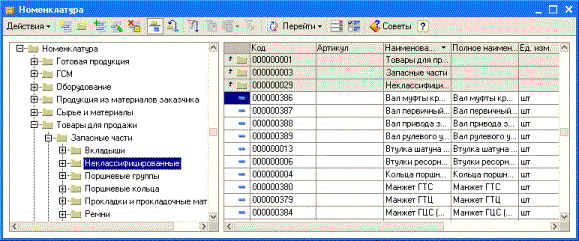
Picture 1. Hierarchy of
groups
There is another kind of hierarchy – Hierarchy of elements.
In this case, acts as a parent directory is not a group of elements, and just
one of the elements of the directory (picture 2).
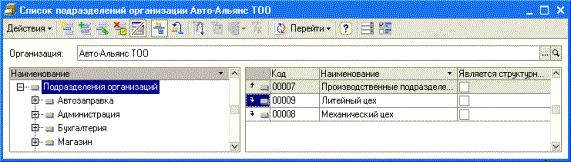
Picture 2. Hierarchy of elements
Enable and disable the
hierarchical list one of the following:
·
Open menu command panel Действия -> Иерархический просмотр;
·
By pressing
the icon on the toolbar  ;
;
·
Bring up the
context menu by clicking the right mouse button and choose Иерархический просмотр.
Consider the basic functionality when working with
directories.
·
Create a new group. To create a new group of elements directory, you can
use the following methods:
o
Open the
command menu panel Действия -> Новая группа;
o
By pressing
the icon on the toolbar  ;
;
o
Press the
key combinations «Ctrl+F9»;
o
Bring up the
context menu by clicking the right mouse button and choose Новая группа.
·
Creating a new element of the directory. Create a new directory entry in the following
ways:
o
Open the
command menu panel Действия -> Добавить;
o
By pressing
the icon on the toolbar  ;
;
o
Pressing «Insert»;
o
Bring up the
context menu by clicking the right mouse button and choose Добавить.
If you want the new element introduced into a
hierarchical directory, just got to a certain group of the directory that
before entering the item should go in this group.For ease of reference desk
elements with uniform set of essential elements in the system "1C:
Enterprise 8.2" provides a mechanism for copying data.
Copy Group and element
reference book. A new item
or group can be introduced into the directory by copying an existing element or
group. To copy the data, you can use one of the ways to position the cursor at
the same time on one item or group of items that will be the source for copying
data:
o
Open the
command menu panel Действия -> Скопировать;
o
By pressing
the icon on the toolbar  ;
;
o
Pressing «F9»;
o
Bring up the
context menu by clicking the right mouse button and choose Скопировать.
As a result, a new element of the directory will be
copied to all the details of the details of the sample element. The new element
will be assigned to the next sequential number.
All elements and groups of
elements directories are open to editing mode 1C.
Editing element and the group
reference. To edit an item or group of
items directory you can do one of the following:
o
Open the
command menu panel Действия -> Изменить;
o
By pressing
the icon on the toolbar  ;
;
o
Pressing «Enter»;
o
Pressing «F2»;
o
Open the
item (group) by double-clicking;
o
Bring up the
context menu by clicking the right mouse button and choose Изменить.
Mark for deletion and removal
element of the reference. To delete items has 2 modes - mark an object for deletion and immediate
removal of the object. Mark the item or group reference to delete the following
ways:
o
Open the command menu panel Действия -> Установить пометку удаления;
o
By pressing
the icon on the toolbar  ;
;
o
Pressing «Delete»;
o
Bring up the
context menu by clicking the right mouse button and choose Установить пометку удаления.
o The immediate removal of elements or groups of
elements reference can be performed using the menu service procedure Операции -> Удаление помеченных объектов.
Cancel marked for deletion in
the following ways:
o
Open the command menu panel Действия -> Установить пометку удаления;
In addition to the above actions on the elements and
groups directories, you can also do the following: make a selection on the
value in the current column, view the history of selections, disable selection,
displaying a list, make a list of settings, update the list. It is possible to
use certain configure stage of selection criteria that expand the list of
selections in the system and are designed to "find" the information
in the manuals and documents. To perform these operations, you can use the
corresponding commands menu command Actions panel, shortcut keys, toolbars or
icons in the context menu.