FEATURES OF ORGANIZATION CONTROL INTERFACE
in "1C: Enterprise 8.2"
Anton Semenov, 4th year student of the specialty
"5B070300 - Information Systems" Sh. A.Baitursynov
Irina Morozova, Senior Lecturer, Department of
Information Systems
KSU. A.Baitursynov
The command interface - is the main navigation tool user functionality
configuration. The system "1C: Enterprise 8.2" it is built on the
basis of sub-systems. The developer must create a configuration hierarchy of
subsystems, which reflects the structure of the functionality for the user
application solution.
All application configuration items (manuals, documents, reports, etc.)
are linked to the developer configuration subsystems. The hierarchy of
sub-systems should reflect the structure function exactly as it will be
presented to the user.
Already on the basis of this information (the structure of the
subsystems and bind objects to subsystems ) platform automatically builds a
command interface to the user. Structure is displayed to the user application
solution (the hierarchy of sub-systems) and provides standard commands to
access the functionality of application objects (call lists, directories,
documents, opening reports, tools , etc.). However, the developer can of course
edit the proposed system, the construction of the command line interface (change
the order and visibility of commands). Is designed to do a number of editors
command interface that allow you to customize various parts of the program.
Editor interface configuration command is used to configure the panel
sections. It allows you to set -up, the order of chapters and their visibility
in the context of roles.
Editor command interface of the main section is intended to set the
teams home page. For the command bar of the current section it allows you to specify
the composition of teams, the order and visibility of the commands in the
context of roles.
Editor command interface is used to configure a command subsystem. It
allows you to specify the composition of teams, their order and their visibility
in the context of roles for the navigation pane and the actions selected
subsystem.
Editor of "All subsystems" allows you to work simultaneously
with all the subsystems configuration (Figure 1).
By the teams included in the command line interface (open lists, commissioning
of new facilities, opening statements, and so on) are provided automatically by
the system . But you can build your team, which will be included in the command
line interface. For this application objects in the metadata of a new branch -
Teams.
The declarative model for building the interface to automatically adapt
the interface for a particular user. To this end there are several options.
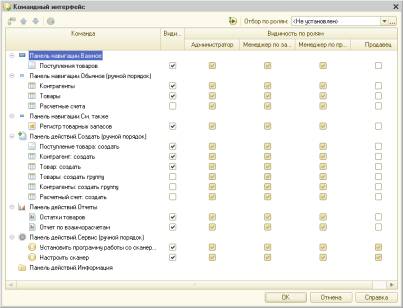
Figure 1. commands
interface
In
"1C: Enterprise 8.2" is used automatic accounting roles and rights.
The system automatically takes into account when building the user's interface.
For example, from the command line interface commands are excluded to access
objects that the user is not available. If the role of the seller only assigned
the rights necessary for entering and holding a document RaskhodTovara, and to
view Products and Accounts , all inaccessible objects is automatically removed
from the system command line interface.
In
addition, the system has the ability to install the rights to the individual
details of the objects. Using this information, the system automatically
eliminates or makes unavailable for editing the appropriate fields in the forms,
and eliminates the columns of the lists and reports.
For
various interface elements of the system (commands, form elements) set the
default visibility for specific roles (Figure 2).
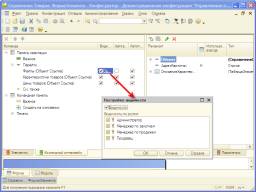
Figure
2. Setting the default visibility
This
allows, depending on the user's roles, to provide him with the most important
piece of functionality, leaving the possibility of including visibility of the
elements that initially it does not appear. The mechanism of the
functional option allows you to specify in the configuration the functionality
that may or may not be used in the implementation depending on the needs of
your organization. The various configuration items (objects, properties,
commands) can be tied to functional options. With the implementation can be
managed on and off functional options in a particular knowledge base. The
system will automatically turn on and off the display of all relevant interface
elements (fields, commands, speaker lists, parts of a report).
Standard
feature that provides the user the system is to customize the appearance of the
command line interface. You can set up all the basic elements of the interface
panel sections, the home page and the command bar of the current chapter.