Musayeva K.S. -
candidate of pedagogic sciences, professor
Bekkozhanova G.H.
– candidate of philological sciences,
Abai
Kazakh National pedagogical University
Teaching foreign language through Web-Quest technology
Abstract. The Internet has become one of the most powerful tools available for
teaching virtually any subject. Some
85% of the world/s electronic information is said to be in English language [1,
50]. That makes it the potential goldmine that maу be of use for teachers for developing students’ knowledge and skills.
One of the effective strategies that can help teachers to integrate the power
of the Web with student learning is the Web-Quest strategy. Originated by
Bernie Dodge and Tom March in 1995 at San Diego University, the Web-Quest has
gained considerable attention from educators and has been integrated widely
throughout the world into curricula in secondary schools and higher education
as a way to make good use of the Internet while engaging their students in the
kinds of thinking that the 21st century requires. This paper describes the
Dodge’s model of a Web-Quest, its design process as suggested by Tom March,
provides the reasons for its use in teaching and learning process and suggests
some excellent sites to explore with the aim of helping teachers to master this effective instructional
tool.
Key
words. Web-Quest, teaching,
Introduction
A Web-Quest is an instructional tool
for inquiry- based learning in which learners interact with resources on the
Internet, develop small group skills in collaborative learning and engage in
higher level thinking. Most or all of the information used by learners is found
from pre-selected websites [2, 1]. A Web-Quest is designed to make the best use
of a learner's time, to focus on using information rather than looking for it,
and to support learners’ higher level thinking skills. In other words, students
use the Internet in such a manner that they learn not only to research
information but to use the Internet to critically think about important issues.
The key idea that distinguishes Web-Quests from other Web-based experiences is
that they are built around an engaging and doable task that elicits higher
order thinking of some kind. The thinking can be creative or critical, and
involve problem solving, judgment, analysis, or synthesis.
To
achieve its efficacy and purpose, Web-Quests should contain at least the
following parts, which are outlined by Bernie Dodge as critical components in a
Web-Quest [3, 2].
The main
part.
1.
Web-quest: purpose. The purpose of the
Introduction section of a Web-Quest is two fold: first, it's to orient the
learner as to what is coming. Secondly, it should raise some interest in the
learner through a variety of means. It can do this by making the topic seem
relevant to the learner's past experience; relevant to the learner's future
goals; attractive, visually interesting; important because of its global
implications; urgent, because of the need for a timely solution; fun, because the
learner will be playing a role or making something. When projects are related
to students’ interests, past experience, or future goals, they are inherently
interesting and exciting. For the example of an Introduction visit the Web-Quest
Creative
Problem Solving designed for ESL students at http://php.indiana.edu/~fpawan/creativestudent.html
2. A task is a formal description
of what students will have accomplished by the end of the Web-Quest. Developing
this task - or the main research question -is the most difficult and creative
aspect of creating a Web-Quest. Students can be asked to publish their findings
on a Web site, collaborate in an online research initiative with another site
or institution, or create a multimedia presentation on a particular aspect of
their research. A well designed task is doable, interesting and elicits
thinking in learners that goes beyond rote comprehension. A good example of the Task is given in the Searching
for China Web-Quest at http://www.kn.pacbell.com/
wired/China/ChinaQuest.html#Task.
3. Information Sources. This block in a Web-Quest is a list of web pages which the instructor
has located that will help the learner accomplish the task. The Resources are
pre-selected so that learners can focus their attention on the topic rather
than surfing aimlessly. Information sources might include web documents, experts
available via e-mail or real-time conferencing, searchable databases on the
net, and books and other documents physically available in the learner's
setting. Very often, it makes sense to divide the list of resources so that
some are examined by everyone in the class, while others are read by subsets of
learners who are playing a specific role or taking a particular perspective.
This can ensure the interdependence of the group and give the learners an
incentive to teach each other what they've learned. You can see an example in
the
Web-Quest Creative Problem Solving at http://php.indiana.edu/
~fpawan/creativestudent.html.
4.
Description of the process. The Process block in a
Web-Quest where the teacher provides clearly suggested steps that learners
should go through in completing the task. It may include strategies for
dividing the task into subtasks, descriptions of roles to be played or
perspectives to be taken by each learner. The instructor can also use this
place to provide learning advice and interpersonal process advice, such as how
to conduct a brainstorming session. For example, the Web-Quest Pollution and
Solutions at http://edweb.sdsu.edu/triton/
PollSol/ Week1. html.
5. Guidance provides guidance on how to organize information. This can
take the form of guiding questions, or descriptions to complete organizational
frameworks such as timelines, concept maps, or caused- effect diagrams etc.
6. Evaluation. The Evaluation block is a new addition to the Web-Quest
model. Each Web-Quest needs a rubric for evaluating students' work. Evaluation
rubrics would take a different form depending on the kind of task given to the
learner. To help teachers to deal with evaluation Dodge has developed A Rubric for Evaluating Web-Quests
which can be found at http://webquest.sdsu.edu/webquestrubric.html.It allows teachers to assign a score to a given Web-Quest and provides
specific, formative feedback for the designer.
7. Conclusion. The Conclusion section of a Web-Quest provides an opportunity to
summarize the experience, to encourage reflection about the process, to extend
and generalize what was learned, or some combination of these. It's not a
critically important piece, but it rounds out the document and provides that
reader with a sense of closure.
Results and
Findings.
Web-Quests are an inquiry-based,
learner-centered, project-based approach to teaching, learning, and information
inquiry that integrates the power of the Web with sound learning theory and
instructional design methods, such as constructivist philosophy; critical and
creative thinking questioning, understanding, and transformational learning;
scaffolding; cooperative learning; motivation and authenticity [6, 1-2].
Constructivism is a theory of teaching
and learning involves the process of questioning, exploring, and reflecting.
This theory says that learners should construct their own understanding and
knowledge of the world through varied experiences. By reflecting on these
experiences, students assimilate useful information and create personal
knowledge.
Creative thinking involves creating
something new or original. It's the skills of flexibility, originality,
fluency, elaboration, brainstorming, modification, associative thinking,
metaphorical thinking and forced relationships [1, 1].
Cooperative
learning is an approach to teaching and learning where
students work in small groups or teams to complete meaningful activities such
as solving problems or creating products. Groups share their strengths and
address their weaknesses as a team. Cooperative strategies are applied to
necessitate each student's input. As students complete more Web-Quests they will
become aware that their individual work has a direct impact of the intelligence
of their group's final product.
Student Motivation & Authenticity. Tom March points out to the following
strategies that are used in Web-Quests
to increase student motivation. First, Web-Quests use a central question
that honestly needs answering. When students are asked to understand,
hypothesize or problem-solve an issue that confronts the real world, they face
an authentic task. The second feature that increases student motivation is that
they are given real resources to work with. Rather than use a dated textbook
with the Web students can directly access individual experts, searchable
databases, current reporting, and even fringe groups to gather their insights.
Developing
Thinking Skills. One of the main features of any Web-Quest is that
student’s deal with questions that prompt higher level thinking. The question
posed to students can not be answered simply by collecting and spitting back
information. A Web-Quest forces students to transform information into
something else: a cluster that maps out the main issues, a comparison, a
hypothesis, a solution, etc. In
order to engage students in higher level cognition, Web-Quests use scaffolding
or prompting which has been shown to facilitate more advanced thinking. In
other words, by breaking the task into meaningful "chunks" and asking
students to undertake specific sub-tasks, a Web-Quest can step them through the
kind of thinking process that more expert learners would typically use.
Using
Web-Quests in our classrooms can help build a solid foundation that will
prepare our students for the future by developing a number of skills that
tomorrow’s workers will need. No one can ever learn everything, but everyone
can better develop their skills and nurture the inquiring attitudes necessary
to continue the generation and examination of knowledge throughout their lives.
For modern education, the skills and the ability to continue learning should be
the most important outcomes. And this is where Web-Quest can help use to meet
these needs.
The
Web-Quest Design Process
Writing a Web-Quest is time-consuming and challenging, at least
the first time. To make this process easier for teachers Tom March developed
the Web-Quest design process which consists of three phases that are presented
below [8; 1]:
The Web-Quest Design Process. Phase 1.
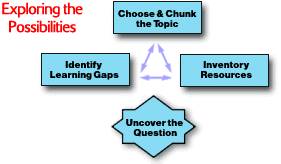 Choose and chunk the topic
It
is necessary to identify a topic that is worth spending time on it and one that
takes advantage of the Web and Web-Quest format. The best use of the Web-Quest format is for topics that invite
creativity and problems with several possible solutions. They can address
open-ended questions like:
-
How do other countries deal with
learning English as a foreign language, and what, if anything, can Kazakhstan
learn from them?
-
What is it like to live in a
developing country such as Kazakhstan?
-
What would Mark Twain think about
the lives that children live today?
Once
you have some ideas for topics, chunk them out into sub-categories by
clustering. You might look for things like relationships to other topics,
controversial issues, multiple perspectives about the topic, etc. This
clustering will help you when it comes time to uncover your main question and
devise roles for learners.
Inventory Resources
When teachers inventory their learning
resources they should collect all the raw materials that COULD go into their
Web-Quest. Later they will need to make choices that limit their options. In
terms of finding good Web sites, the following sites that lead to a huge number
of interesting and useful lessons, resources, and activities can be a good
starting points for exploration:
-
Education World- http://www.education-world.com/
-
Language Arts- http://www.mcrel.org/lesson-plans/index.asp
-
Foreign Language - http://www.mcrel.org/lesson-plans/foreign/index.asp
Decision:
Uncover the Question
The
single most important aspect of a Web-Quest is its Question. The Question / Task
serves to focus your entire Web-Quest and helps students engage in higher-order
thinking. It makes students look beyond the facts to how things relate, what is
the truth, how good or right something is. In writing Question / Task
Statement, Tom March suggests to consider the following things that provide
higher levels of thinking:
-
analyzing and classifying the main
parts of a topic
-
using these main parts as criteria
from which to evaluate examples of the topic
-
analyzing perspectives and opinions
through comparison / contrast
-
using an understanding of people's
opinions to make a persuasive argument
-
analyzing how things change through
cause and effect and If/Then statements
-
using if/then statements to problem
solving new situations [9, 1].
It is important to note
that this last box in this phase isn't actually a box like
the other three. This
section requires a teacher to make a decision. The decision is, "Do you
have what it takes to make a Web-Quest?" Answering the questions below
questions will help a teacher to elicit a positive response:
-
Is the Topic worth the time and
effort needed to build this Web Quest?
-
Is the level of potential student
cognition worth the effort?
-
Is a Web-Quest the right strategy?
-
Are you excited by the available
resources (both online and local)?
-
Does the Web offer so much that its
use is warranted?
-
Does the Question ask something that
people in the real world find important?
-
Is the answer to the question open
to interpretation / argument / hypothesis?
If
you've answered “Yes” to all the questions above, you're on the way to creating
a great WebQuest!
Teachers need to learn how to
effectively use the Internet to support the teaching and learning process. They
should spend time defining an information need, searching for information, and
evaluating the information before attempting to incorporate it into a lesson.
Being one of the effective strategies the Web-Quest strategy can help teachers to integrate the
power of the Web with student learning is in a way that makes sense for the New
WWW. This is because Web-Quests are found to be an activity that integrates the
power of the Web with sound learning theory and instructional design methods
and plants the seeds of change and growth so that students will internalize
some of these cognitive strategies and apply them to lifelong and self-directed
learning.
Bibliography
1. Creative and Inventive Thinking. Available: http://virtualinquiry.com/scientist/creative.htm.
2. Dodge B. Active learning on the
web. Available: http://edweb.sdsu.edu/people/bdodge/active/ActiveLearningk-12.html,
1996.
3. Dodge B. WebQuest rubric.
Available: http://webquest.sdsu.edu/webquestrubric.html, 2001.
4. Dodge B. WebQuest.org. Available: http://webquest.org,
2004.
5. March T. Working the web for
education: Theory and practice on integrating the web for learning. Updated
2001. Available: http://www.ozline.com/learning/theory.html, 1997.
6. March T. Why WebQuests? Updated
January 6, 2004. Available:
7.
http://www.internet4classrooms.com/why_webquest.htm, 1998.