TOWARDS THE CREATION OF MOBILE APPLICATIONS
Ashimova Moldir, master course student
Daurenbekov K.K., Candidates of Technical Sciences
Korkyt Ata Kyzylorda State University
Аннотация
В статье автор отмечает, что мобильное приложение с
основными аспектами программного обеспечения
играет большую роль в оказании помощи
школьникам при подготовке к тесту. В связи с этим рассматривает особенности создания мобильных
приложений, в частности Android, на языке программирования
Java. Одной из главных причин
создания мобильных приложений такого порядка, по мнению
автора, является совершенствование
способов использования высоких технологий, особенно мобильных телефонов и
гаджетов в сфере образования.
Ключевые слова:
мобильное приложение, язык программирования, моделирование, мобильное
устройство, схема работы
Currently
in Kazakhstan for admission to institutions of higher education and training on
a budgetary basis need to take the Unified National Test (ENT) for school
leavers and graduates of colleges - comprehensive testing (CT) entrants. In
preparation for this form of the exam, anyone can be faced with a problem like
a never-ending flow of information, and is not always necessary.
There
will be 3 options in my mobile application. The first part is the result of
test questions, the second part of learning - if the user doesn’t know the
topics, selected chapters of the question, the object, he can use the search to
find the topic. The third section offers settings menu where the user can
change the selected user interface language or transparent determine its own
result with the test. This application there is a user interface with the
animation.
As
I mentioned, there are many similar applications like mine. For example:
TestPromENT, ENT 2013 beta and a lot of other good programs. However, I will
focus on the first two, the most popular, among other things: TestPromENT, ENT 2013 beta.
This
application is developed based on Android, allow you to use the search
questions to the ENT freely, in case you do not have access to the Internet at
the moment, in any place and at any time. To update the database one only needs
to connect the phone to the Internet. The application itself supports two
languages: Kazakh and Russian. It consists of subjects such as the Russian
language, geography, English, Kazakh, biology, world history and the history of
Kazakhstan. ENT 2013 - a program written specifically for prospective students.
The program consists of 11 items, which has more than 200 versions of 25
questions and answers for each case, which ultimately equals 55 000 questions
and answers. Such a number of questions with answers is intended for students
enrolled in Kazakh schools, and for students of Russian schools there to collect
some 110 000 questions and answers.

Picture 1 ENT 2013 beta Android
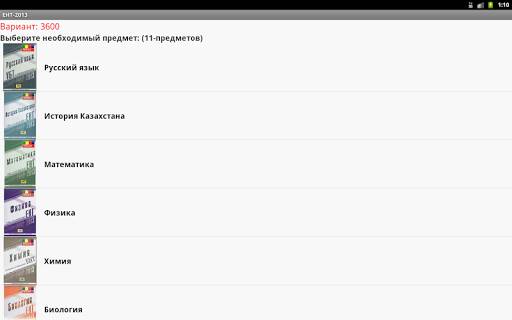
Figure 2 The list of subjects
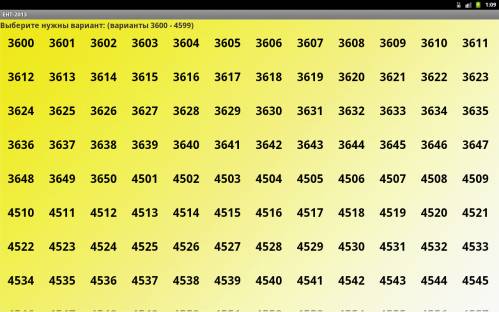
Figure 3 Versions, in the chosen subject
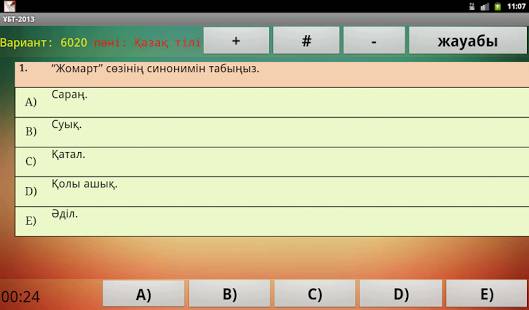
Figure
4 Location of questions in the tests
Android - is a
mobile operating system developed by Google. It is used in several smart phones
such as the Motorola Droid, Samsung Galaxy, and the Nexus One, developed by
Google. Operating System (OS) Android is based on Linux. Between the
application and the kernel API is a layer and a layer of native code libraries.
Unlike the iPhone OS, Android open source means that developers can modify and
customize the OS for your phone yourself[1,2,3] .
Thus, various Android-phones may have different
graphical user interfaces, even if they use the same operating system. Android
phones tend to have a few built-in applications, but also support third-party
programs. It can run many applications. But one of them is the
"main", is occupy the entire screen. Based on the current
application, you can go to the previous or start a new one. This is reminiscent
of the browser with the browsing history. Developers can create applications
for Android using the free Android SDK (Software Developer Kit). Applications
are written in Java, and they run through the Dalvik Virtual Machine, which is
optimized for mobile devices. Users can download the application from Android
Market, simply connect to the Internet [2]. In this case, the application developer
needs to know all the features and nuances of Android to get a good result.
There are some challenges that need to be considered when designing. List them
briefly:
- The application requires to be installed twice (or
even four) more space than the original size of the application;
- The speed of the files on the internal flash card
falls ten times with a decrease in free space;
- Each process can use up to 16 MB (sometimes 24 MB)
of RAM.

Figure 5 Application icon
It's
only been two years since the introduction of the first Android phone. During
this short period of time Android was impressive way from the usual prototype
device to the second most popular OS in the Smartphone market worldwide. In
addition, according to some recent studies, he managed to overthrow the Symbian
from Nokia, which for 10 years has been at the top. Without a doubt, Android is
now the world leader in terms of growth. Year after year, it does not lose its
potential to further increase sales. Table 1.1 shows the data collected in 2010
compared with 2009. Despite the means growth for the whole market (70% year by
year). Figure 6 shows how many Android Smartphones are sold on the market of.
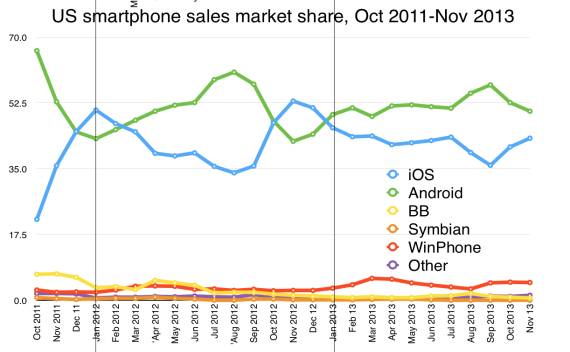
Figure 6
Of course, it is not the
only Android OS. It is produces in various versions with new updates every six
months or even more frequently. Until now, all new updates to keep the overall
backward compatibility, but it is likely to become more problematic as Google
launches tablet optimized version 3.0 – Honeycomb. Figure 7 shows the
distribution of versions of Android by actualization. Data has been collected
from requests that came from mobile devices to the Android Market during 14
days before April the 1st 2011.
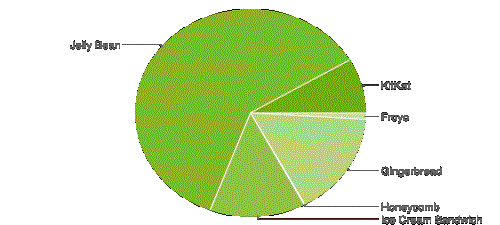
Figure 7 Android version (April 2011), source: Android
Developers
Although Android is relatively new system, it has good documentation.
Those who want to know more information about this OS can visit the official
website of the developers ([AND]). There are a number of publications and books
for people who are looking for basic information and an introduction to the
system. In addition, plenty of developer communities, where they actively
exchanged questions and answers about web services such as Google Groups
([APP]), Android Blog ([ADB]) or Stack Overflow ([ASO]). It makes no sense to
quote excerpts from the leadership development of Android. Instead, this
section will address the main aspects of designing an application for Android,
which are necessary in order to understand the following concept - Android App
[3].
All applications for Android contain zero or more
components. Android Application operates using windows (similar to Windows),
but in this system above windows are another name - Activity. As in Windows,
each window has its own life cycle and its peculiarities.
When creating a new window method is called onCreate(),
in the development of this method is overridden, and it initializes the
application and its components. Further methods are invoked onStart() and
onResume().
Both methods are called before showing a window when it
is created or restore (when switching from another application, when you expand
a minimized application etc). When you minimize the methods are invoked
onPause() and onStop(). When you close the application window and called
onDestory(), in this method, you can save user data and settings.
Full description and sequence of method calls can be found
on the official website. The general scheme of the application lifecycle for
Android is shown in Figure 8.
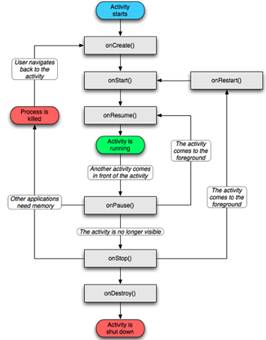
Figure
8 The life cycle of the application for the system running Android
Activity - is a component of an application that
provides a screen with which users can interact with in order to do something,
for example, to dial a phone number, take pictures, send an e-mail or uses the
card. Activity issued each window in which the user has interface. The window
usually fills the entire screen, but may be less than the screen and float on
top of other windows.
Application usually consists of several actions that
are loosely coupled with each other. As a rule, one of the Activity in the
Application is referred to as the "main" Activity, which is presented
to the user when the application starts for the first time. Each Activity can
start another Activity in a specific order to perform various actions. Every
time begins a new Activity, previous stops, but the system remains active in
the stack ("back stack"). When starting a new Activity, it is placed
in the back stack, but it remains in the field of view of the user.
Back Stack adheres to the mechanism of "last in,
first out", so that when the user has finished with the current Activity
and presses the "Back" button, it is removed from the stack (and
destroyed) and previous Activity resumes.
When Activity discontinued due to a new Activity, it
will be notified of the change due to the method of Activity - lifecycle
callback methods. There are several callback methods that Activity may receive
in connection with a change in his condition, whether the system will create
it, it is stopped, resuming it, or destroy him- and each callback provides you
with the ability to perform a specific job, the right to change the state. For
example, when it stops, your Activity should release any large objects such as
a network or database connections.
Activity is resumed when you can purchase the
necessary resources and resume activities that were interrupted. These state
transitions are part of the entire life cycle of Activity. The remainder of
this paper discusses the basics of how to create and use the Activity,
including a full discussion about how working life cycle Activity, so that you
can properly manage the transition between different Activity. We give a
description of some:
• Service (Service) - a separate part of the application without a
graphical representation (running in the background). The service itself does
not run in a separate thread, because it works in the context of, or broadcast
receiver, who started it. However, as a general rule, you should use a workflow
to perform some complex calculation of length I / O operations.
• The content provider (Content Provider) - a mechanism that allows
applications to communicate with each other or simply stable store some
information. This is basically an interface that provides a standard data
access methods like query, insert, update, delete. It is not always certain
type of data structure is imposed by the system, it may be a single database
file or SQLite.
content://<authority>/..<type path>../<id>/
• BroadCast Receiver - part of the
proposal, which responds to the action, broadcast by the system (such as
dimming the brightness of the screen, take a new picture), or other parts of
the application (the same or not). He does not have its own graphical
representation, but it can initiate certain steps to keep users informed. This
can be done, for example, by creating a notification in the status bar or
upgrade desktop widgets.
• Intent - report object that you can use to request action from another
component of the application. Although Intent to facilitate communication
between the components in several ways, there are three main scenarios using
it.
To start Activity: Activity is a single screen in the
application. You can start a new instance of activity, transferring Intent on
startActivity(). Intent describes the Activity, to develop and implement all
the necessary data. If you want to get a result from the Activity, when it
ends, use startActivityForResult(). Your Activity receives the result as a
separate object in the Intent onActivityResult(). For more information, refer
to the Activity. To run the Service: Service - a component that performs in the
background without the user interface.
You can run the Service to perform a one-time
operation (for example, to download the file), passing in the Intent
StartService(). Intent describes the Service to run and provides all the
necessary data. If the service is designed with the client-server interface,
you can link to the Service from another component by clicking Intent
bindService(). For more information, refer to the Service. For the delivery of
broadcast: Broadcast - a message that can get any application. The system
provides a variety of transmission for system events, such as system boot or
start charging the device. You can put other broadcast applications,
transferring Intent in sendBroadcast(), sendOrderedBroadcast (), or
sendStickyBroadcast().
There are two types of Intent: explicit and implicit
Intent. Explicit Intent indicates the component to start name (his full name of
the class). You usually will use explicit Intent to start the component in your
application, because you know the name of the Activity class or Service that
you want to run. For example, you can start a new Activity in response to user
actions or run Service, to download the file in the background. Implicit Intent
not names a specific component, but instead declares a general action to
perform, which allows the component from another application to handle it. For
example, if you want to show the user location on the map, you can use implicit
Intent, asking another application shows the specified location on the map.
[4,5].
Android
is a mobile application for secondary school students. The main reason for
creation of this appendix consists in improving the ways of use of high
technologies, especially mobile phones and gadgets in education.
REFERENCES:
1. James Gosling, Bill Joy, Guy Steele, Gilad
Bracha - The Java Language Specification, Second Edition
2. Гослинг Дж., Арнольд К. - Язык программирования Java
3. Tim
Lindholm, Frank Yellin - The Java Virtual Machine Specification, Second
Edition.
4. Акулов, О.А.
Информатика: базовый курс: учеб. пособие для студентов / О.А. Акулов, Н.В.
Медведев. – М.: Омега-Л, 2005. -552с.
5. Электронный учебник по информатике / Турешбаев А.Т., Омарова У.Ш., Ким С.Т. каф.
«ПМиКТ» КГУ им. Коркыт Ата. - Кызылорда, 2001