Современные
информационные технологии/2. Вычислительная техника и программирование
N.Karbenova, student
of the specialty 5B070300 - Information systems
N.Nechitailo, master of natural sciences
A. Baytursynov Kostanay State University, Kazakhstan
Design of the information module «Service of
tourist excursions»
Design of the
interface of the program – one of easy problems of programming. Speed of
execution of operation directly depends on convenience of the interface.
Three main parts
of development of the interface following: panel design, design of a dialog and
representation of windows.
In the program
there are five working forms:
1. Service of
tourist excursions – in it is made by all actions of the program.
2. To add –
represents the table intended for input of necessary parameters and data.
3. To add record –
a window of adding of record in the table.
4. To edit record
– an edit window of entry in the table.
5. The diagram –
removes data retrieveds in a graphic look.
All these forms
are necessary for the correct program runtime. By development the following
objects of the interface were used:
For a start the
user needs to launch the program which is in the Service of Tourist Excursions
folder, and to launch t_ekskursiy.exe executable file. After start on the
screen of the user there will be a primary window of the program.
To start operation it is necessary to
specify number of capacity of places in the bus. (see. Figure 1).
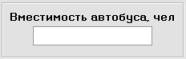
Figure 1. Input of capacity of people in the bus
For information adding in the
table it is necessary to click the toolbar button to add  . Then
the program will launch the Add window (see. Figure 2).
. Then
the program will launch the Add window (see. Figure 2).
For implementation of calculations, it is necessary to
enter initial data in a window and to save the entered data.
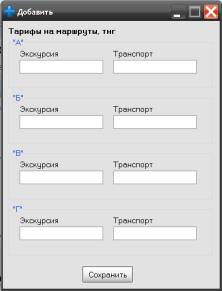
Figure 2. Window of adding of data
When the user made information adding, the table will
have the following appearance (see. Figure 3). One of pluses of the program is
automatic check, calculation and an output of necessary data.
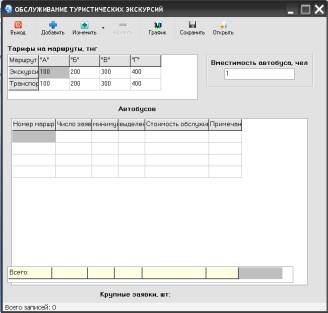
Figure 3. The table with the data entered in it
Also there is a possibility of editing of already
available data by means of the Change function. In the program it is possible
to change both data on rates and routes and data on buses. For this purpose it
is necessary to select already entered record and to press the Change button  at a toolbar. There will be a dropdown list
of the menu of change.
at a toolbar. There will be a dropdown list
of the menu of change.
After menu picking there will be a window for change
of data which has an appearance (see. Figure 4).
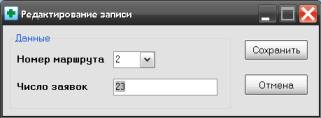
Figure 4. Edit window of records
For graphic viewing of data it is necessary to press
the diagram the button  at a toolbar then there will be a window with
display of the graphic information by data in the table.
at a toolbar then there will be a window with
display of the graphic information by data in the table.
The
database called "Service of tourist excursions" became result of an
application programming. Research of components of a software environment of
Delphi which were used in case of program creation was conducted.
Proceeding
from results of this research, the following shortcomings of the received
software product are revealed:
1. Limited
number of functions of the program.
2. Data
on service cost should be entered each time again.
However,
in addition to shortcomings which each software product has, there are also
advantages at this program:
1.
Software product малотребователен to system
resources of the computer.
2.
Simplicity and clearness of the interface.
3.
Speed of calculations.
4.
Graphic visualization of data
As a
result of the accounting of all made above notes possibly improving of the
created software product towards the greatest visualization and functionality,
and also development of the most convenient interface for use database of
«Service of Tourist Excursions».
Literature:
1 Neil Dzh. Rubenking. The Delphi programming language for
"teapots". Introduction in Borland Delphi 2006
2 Kultin N. B - Programming essentials in Delphi 7 - Sankt – Petersburg,
2003;
3 Vladimir Hoffman and Anatoly Homonenko. "Delphi" Fast start.
St. Petersburg. "BHV –
Petersburg" 2003.
4 Yakovenko E.Yu. Borland Delphi 7.0 for rapid application development.