L. Spirina, senior lecturer, A.Baitursynov Kostanay
state university, Kazakhstan.
V. Lifenko, candidate of physics-mathematical
sciences, associate professor, A.Baitursynov Kostanay state university,
Kazakhstan, Asia.
V. Ilnitckii - Senior teacher of computer science
department of Akhmet Baitursynov Kostanay State university, Kazakhstan, Asia.
The Functionality and Structure of Database “Enrollee”
Abstract: This article gives a description of the functionality of the program
for e-documentation that allows applicants to get information about the
specialty and university and automate the work of the selection committee. Microsoft
Access is used for forming the database.
Keywords: enrollee, applicant, selection, database.
Introduction. Nowadays
in education are not fully used the software tools, that provide enrollees with
information about entering the university and automate the process of recording
and reporting, are not fully used.
The relevance of the problem is the fact that most of their
time admissions officers spend most of their time handling a variety of textual
information of the applicants.
The efficient processing of text information is in database
that forms the basis of computer software of information processes.
In program “Enrollee” the database is
formed to store information, process, filter and sort it. For handling
information blocks in Microsoft Access [1,2] for the objects there were created
simple inquiries that select information on one field and complex inquiries
with two or even five tabular fields.
When creating an inquiry to select enrollees by name, an
advanced inquiry was done. The operation on such an inquiry is realized without
full implementation of enrollee names. The inquiry to select the enrollees is as
follows:
Like [Enter the name of applicant]
& “*”
Through the choice of fixed meanings in the
database inquiries are used to choose a particular meaning. In order to select
applicants by citizenship it is necessary to do the following:
[Enter the applicant's citizenship – “Kazakhstan / Russia /
etc”:])
The most difficult inquiries are the
date inquiries with blanks. Their task is to display the results of data that
lie between the first and last date. The inguiry to select applicants by date
of birth and the applications has the following format:
Between [Enter the first date]
And [Enter the last date]
To select applicants whose scores for UNT are equal and
exceed the threshold line, a simple comparison is used:
> [Enter the passing score]
To exclude situations with the wrong filling of inquiries the
output format is used.
The Guide for Users
When you open the program you can see the menu on the
monitor screen. The main form “Enrollee 2014” includes five items: basic information,
search, selection of applicants, reports and exit out of the application.
If you select the first menu item, the
form containing basic information about the departments and courses available
at the university appears on the screen, as well as information on admission
(Picure 1):
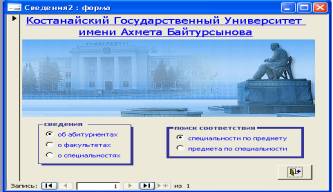
Picture 1. General
information
With this form the enrollee
can view a list of specialties, which you can make depending on the majors or
get information about the subjects required for admission to their chosen
specialty.
When you select “Search
enrollees”, proceed to the next Switchboard, which contains a variety of ways
to search for applicants and the opportunity to return to the main form.
The result of the function
“Selection of applicants” is a form with options “for personal information” and
“information on training” (Picture 2).
Selecting of personal information Selecting of training information
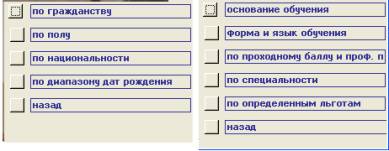
Picture 2. Selecting of
applicants
The fourth menu item contains a set of reports on the field
of study grants, preferential conditions for providing rooms for nonresidents.
Conclusion.Thus, the developed program allows applicants to obtain the necessary
information on the chosen specialty and provided benefits and services, as well
as effectively and efficiently process information about entering the
university.
Список использованных источников
1.
Бакаревич Ю.Б., Пушкина Н.В. Самоучитель Microsoft Access 2007. – СПб.: БХВ-Петербург, 2002.
– 720 с.
2.
Бакаревич Ю.Б., Пушкина Н.В. MS Access 2000 за 30 занятий. – СПб.:
БХВ-Петербург, 2001. – 510 с.