L. Spirina, senior lecturer,
A.Baitursynov Kostanay state university, Kazakhstan.
V. Lifenko, candidate of physics-mathematical
sciences, associate professor, A.Baitursynov Kostanay state university,
Kazakhstan, Asia.
V. Ilnitckii - Senior teacher of computer science
department of Akhmet Baitursynov Kostanay State university, Kazakhstan, Asia.
Automation of activity
account of a virtual store by forming information database Microsoft SQL Server
2000
Abstract: The description of the functionality of software developed on the
basis of System of Using Database (SUD) for the design of information database of
commercial structure and advertising is given in the article.
Keywords: software, automation, database, virtual.
Introduction. The economic efficiency of any enterprise is determined by optimal
decisions for handling the flow of information. The usage of new information
technology increases productivity of any commercial structure.
One of the problems in commercial structures and enterprises is to work
with customers and clients. The software developed on the basis of SUD lets
people organize the process of automation of specialists` work in order to get
and account orders and form reporting documentation.
Functionality of the
software. Economic tasks for which the software SUD is
developed are wide and varied. Enterprise information systems at various levels
are based on the software SUD.
In the program functions for getting customer information, searching,
filtering, reporting the orders and conducted trading operations are
implemented.
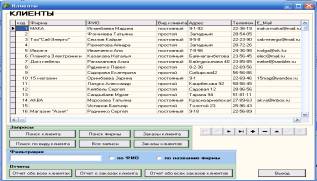
Picture 1. Form "Clients"
On the main panel operations
such as the “Checkout”, “List”, “Queries”, “Search by Customer”, “Customer
Orders”, “Exit” are realized. You can get a report of all customers and their
orders by pressing buttons “Report about all clients” and “Report about a
client`s orders” (Picture 1).

Picture 2. “Buttons of the main form”
The work with applications
is optimized by the buttons of the main form. The first button opens the form “Employees",
the second button opens the form “Clients”, the third button – “Orders”, the
fourth button – “Advertising Price list”, the fifth - “Places of advertising”
and the sixth button – “Exit”.
Advertising is necessary for the
development of small and medium businesses, it allows the company to advertise
their products or services. With the help of the menu you can open table
“Employees”, “Clients” and “Types of advertising” and “Places of advertising”,
which in turn are subdivided into several tables. Using button “Price List”,
you can see types of advertisements and their prices. When you click on button
“Clients”, there appears a list of buttons with which you can perform certain
actions on customers. While implementing operation “Places of advertisements” a
submenu with the titles “Newspaper”, “Billboard”, “TV channel” opens (Picture
2)
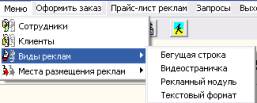
Picture 3. “Types of advertising”
When you press button
“Types of advertising” a submenu with “Ticker”, “Video page”, “Advertising
module”, “Text Format” opens (Picture 3). The use of advertising helps to
reduce the costs of sales of products and to increase the volume of sold goods
and services.
Conclusion. The automation of virtual operations optimizes the process of
functioning of virtual commercial project
and maximizes profit from advertising.
Список использованных источников
1. Бойко В.В., Савинков В.М. Проектирование информационной базы автоматизированной системы на основе СУБД. М.: Финансы
и статистика, 1999, С. 210-212.
2. Microsoft Corporation.
Проектирование и реализация баз данных Microsoft SQL Server 2000. Учебный курс,
М.:2003.